Perimeter Security
Home > Solutions > Perimeter Security
Your Cameras Cover the Perimeter. Now Make Them Act on It.
Sixteen perimeter detections on the cameras you already own — intrusion, tripwire crossings, loitering, after-hours activity, tailgating, fence-climbing, and someone tampering with a camera. No security team staring at monitors. No incidents discovered in tomorrow's footage review.
The problem
Cameras Don't Prevent Incidents. Intelligence Does.
Most operations have cameras covering every gate, fence line, and entry point. But footage is only as useful as someone’s ability to watch it — and no one can watch everything at once.
Incidents are typically discovered during post-event review. By then, the damage is done: unauthorized access has occurred, assets have been compromised, or a safety breach has escalated into something worse.
Nsightify changes the equation. Instead of recording what happened, it alerts you while it’s happening.
Capabilities
Proactive Detection Across Your Entire Perimeter
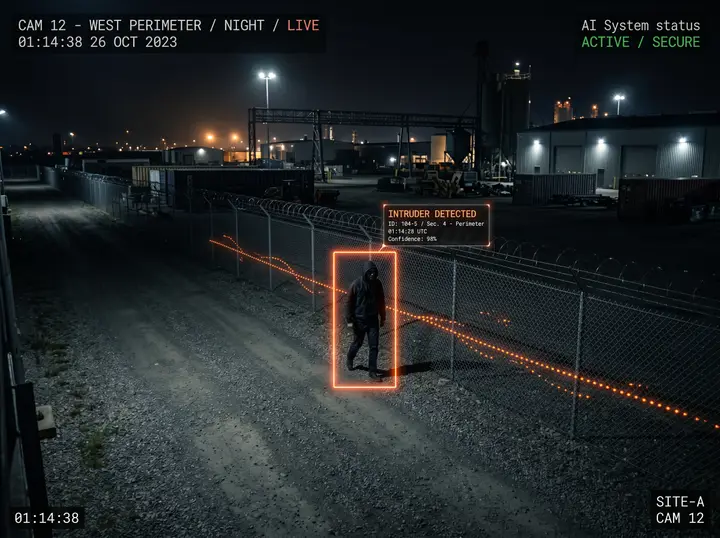
Unauthorized Entry & Boundary-Breach Detection
Nsightify detects unauthorized individuals entering controlled sites, restricted perimeters, or secured areas and generates an immediate alert. Draw virtual boundaries around your property or specific zones — every crossing is flagged in real time with a timestamped event log.
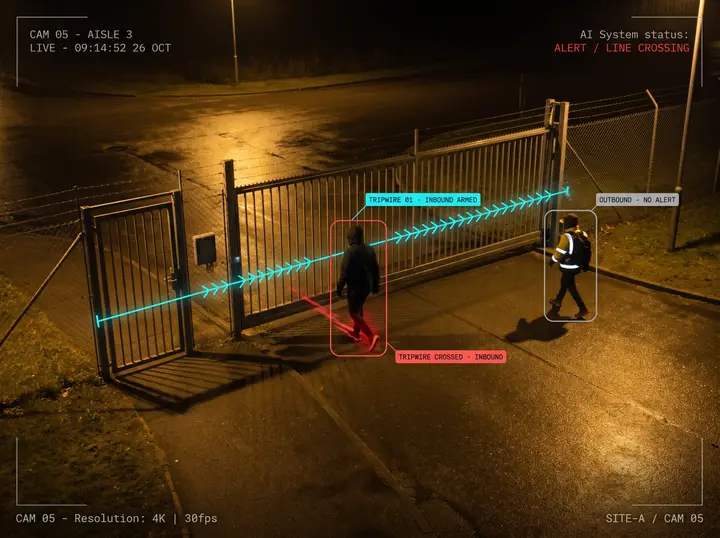
Directional Tripwire Crossing
Draw a line across a gate, a fence run, a loading bay, or a one-way doorway, and choose which direction matters. Nsightify alerts on someone coming in without alerting on everyone going out. It is the most precise perimeter control available — and the one that generates the fewest alerts nobody needed.
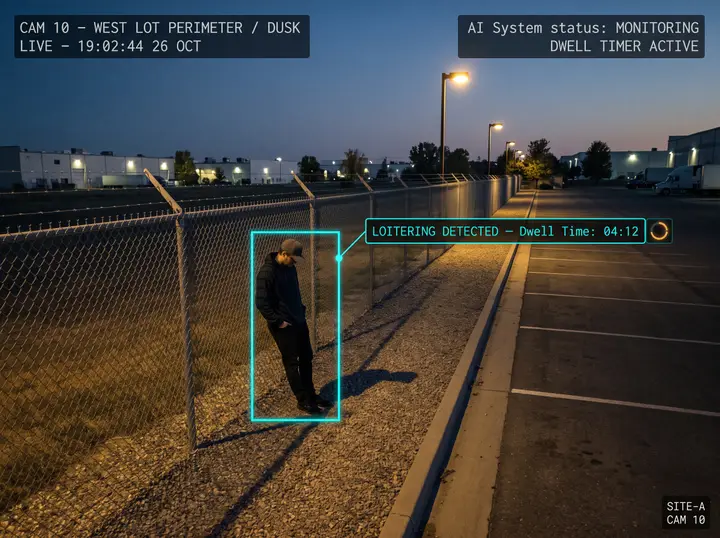
Loitering & Suspicious-Lingering Detection
Identify when a person or vehicle remains in a zone beyond a set dwell time. Whether it's someone lingering near a fence line, an unmarked vehicle idling by a gate, or activity in a normally empty area — Nsightify alerts before the situation escalates.
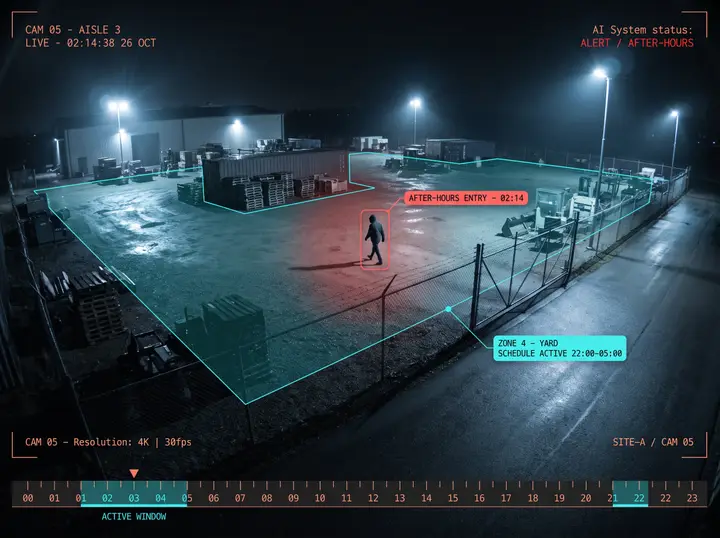
After-Hours Zone Entry
After-hours intrusions are among the most costly security incidents. Nsightify watches your yards and entrances on a schedule you set — silent through the working day, alert the moment someone is there at 02:00. That schedule is the point: it stays a night alarm your team trusts instead of a second feed nobody reads. Coverage continues through connectivity outages.
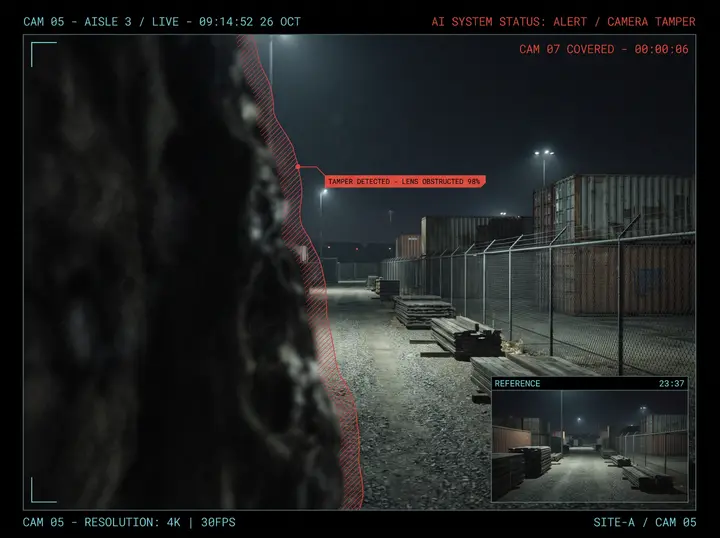
Camera Tampering Detection
A camera that has been blinded protects nothing, and a frozen feed looks exactly like a quiet night. Nsightify flags a lens that has been obstructed, spray-painted, defocused, or repositioned — and a feed that has stopped moving — within seconds. It reads the picture itself rather than the objects in it, so it covers every camera you own regardless of what that camera is pointed at.
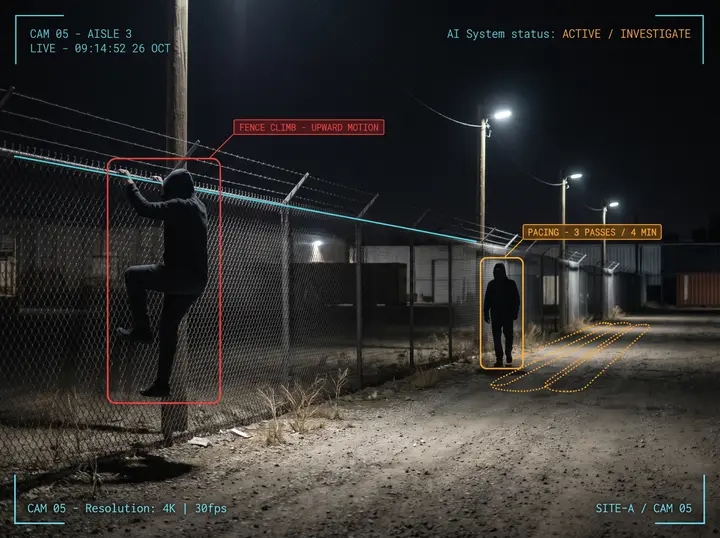
Fence-Climbing & Perimeter Pacing Detection
The two behaviours that precede a breach. Pacing flags someone moving back and forth along the same stretch of fence — the classic reconnaissance pattern. Fence-climbing flags sustained upward movement against your fence line. Both give your team the chance to respond while the intruder is still outside. Each is calibrated against your own footage during commissioning.
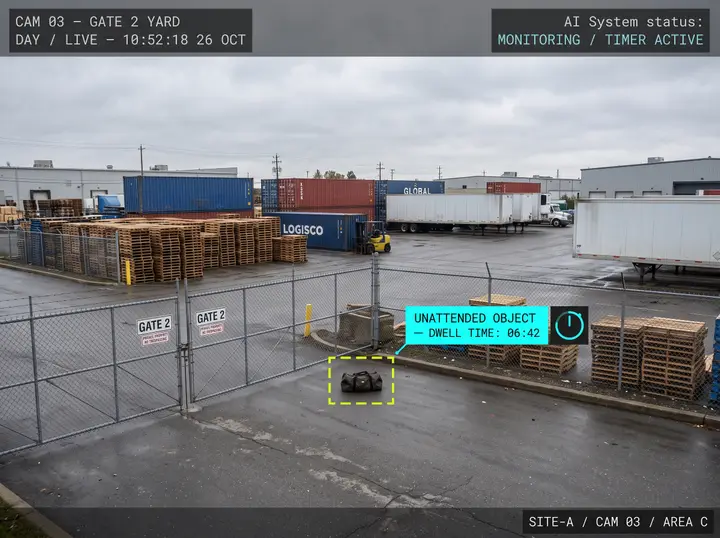
Abandoned-Object Detection
Detect when an object — a bag, box, or package — is left unattended in a monitored zone for an extended period. Useful for construction sites, logistics yards, and any area where unattended items may indicate a security threat.
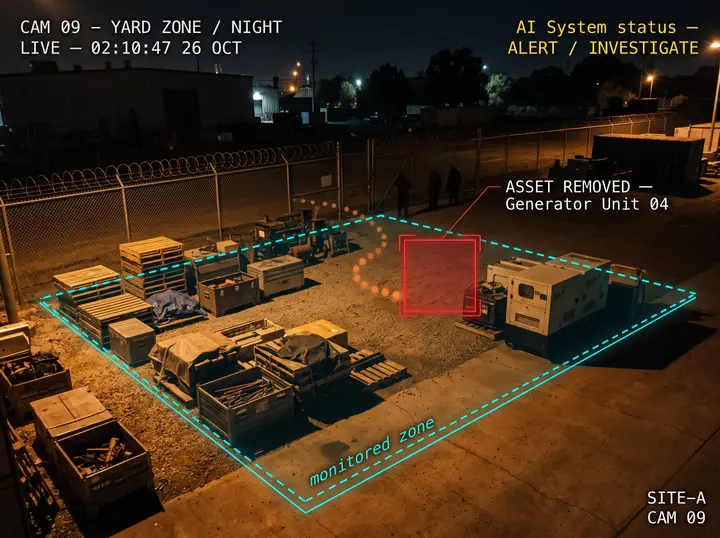
Asset-Removal Detection
Know when an object of interest is removed from a defined zone. Whether it's equipment, materials, or inventory — Nsightify alerts you the moment something that should be there isn't, helping prevent theft and unauthorized removal.
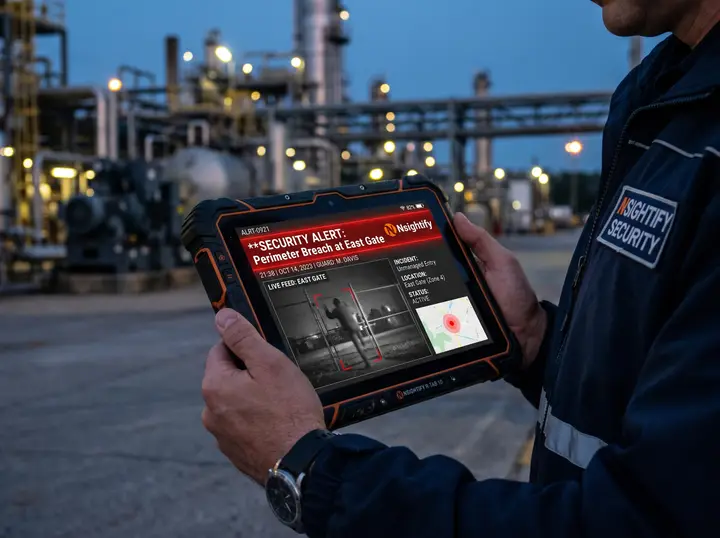
Alerts That Reach the Right People, Immediately
Perimeter breach alerts route to on-site staff, a security dashboard, or your own systems over an API and outbound webhooks. No alert gets buried in unreviewed footage. The right person knows within seconds.
What's included
Sixteen Detections. All of Them Included.
Every detection below ships with Perimeter Security and is visible in your settings from day one. There is no premium bundle and no add-on module. The only difference between the two groups is whether a detection is ready to run now or needs tuning against your footage first.
Included and ready to run
11 detections
All eleven ship with the solution and are configurable from the day your cameras are connected. Some start the moment a zone or line is drawn; the rest are a single toggle away in the camera's settings, because not every detection belongs on every camera.
-
Intrusion into a restricted zone
The anchor detection of the solution. A person or vehicle enters an area you have marked as off-limits — a fenced yard, a plant room, a protected asset — and the alert fires immediately.
-
Directional tripwire crossing
A virtual line across a gate, fence line, loading bay, or one-way doorway, with a direction attached. The most precise perimeter control there is: you are alerted to someone coming in without being alerted to everyone going out.
-
Loitering
Someone stays in a monitored area past the dwell time you set without leaving. Storefronts, ATMs, entrances, and the quiet corners of a yard where nobody has a reason to linger.
-
After-hours zone entry
Zone presence gated by a schedule — anybody in the yard at 02:00. Silent through business hours by design, so it stays the low-noise night alarm rather than a second intrusion feed.
-
Camera tampering
A lens obstructed, spray-painted, defocused, or repositioned, and a feed that has quietly frozen. It watches the picture itself rather than the objects in it, so it protects every camera regardless of what that camera is pointed at.
-
Tailgating and piggybacking
Two or more people passing an access point in quick succession on one credential. The standard control for badge-secured doors and turnstiles, and the gap most access-control systems cannot see on their own.
-
Restricted-area dwell
Loitering's stricter sibling for genuinely restricted space. Where loitering waits, this escalates to critical the moment someone stops moving through and starts standing still.
-
Crowd and occupancy limits
A live headcount for any area, with an alert above the maximum you set. It also feeds a continuous count to your dashboard, so it is an operations metric as much as an alarm.
-
Stopped vehicle
A vehicle standing where nothing should stand — a fire lane, a gate approach, a drop-off lane, a shoulder. Alerts once it has been stationary longer than you allow.
-
People and vehicle counting
Directional counts across any line, reported on an interval. Entry and exit volumes, yard traffic, and gate flow, without a clicker or a spreadsheet.
-
Person and vehicle classification
A rolling record of what each camera is actually seeing. The instrument you use to understand a site's normal baseline before you decide what should raise an alarm.
Calibrated to your site first
5 detections
Also included, and switched on during commissioning once they have been tuned against your own footage. They wait until then on purpose — nobody should be woken at 3am by an alarm nobody has calibrated.
-
Wrong-way and direction violation
Anything travelling against the expected flow: a wrong-way driver, a vehicle reversing through a one-way lane, a person moving against traffic.
-
Perimeter pacing and reconnaissance
Someone walking back and forth along the same stretch of fence. It is the classic pre-incident pattern and almost nothing else on the market looks for it — which is exactly why it deserves tuning against your site before it goes live.
-
Fence-climbing and wall scaling
Sustained upward movement against a reference line drawn along the top of your fence. Early warning while the intruder is still outside, rather than confirmation once they are in.
-
Abandoned object
A bag, package, or piece of equipment left unattended past a threshold. Lobbies, transit areas, and any space where an item nobody claims is a question worth asking.
-
Removed object
A high-value item disappearing from an area you are watching — equipment, stock, artwork. You learn it is gone in seconds rather than at the next stock count.
How it works
Perimeter Intelligence in Three Steps
Connect
Connect Nsightify to your existing perimeter cameras via RTSP. Any IP camera works. No rewiring, no camera replacement.
Define
Draw your perimeter boundaries and restricted zones in Nsightify’s configuration interface. Set alert conditions, time windows, and notification routing for each area.
Monitor
Nsightify watches every camera continuously. The moment a boundary is breached, an alert fires — in real time, not in the morning’s footage review.
What setup involves
Three Things Worth Knowing Before You Start
You decide where the boundaries are. Zone detections prompt you with a shape to place on the camera view. Line detections — tripwire crossing, counting, tailgating, fence-climbing — need you to draw the line first, and they stay quiet until you do. It takes a minute per camera and it is the difference between alerts that matter and alerts your team learns to ignore.
Any detection can be put on a schedule, not just the after-hours one. Restrict a detection to a shift, a night window, or a weekend, and choose whether evidence is still captured outside it.
Commissioning tunes the system to your site. Time windows are set to your timezone, and the early-access detections are calibrated against your own footage before they are switched on — so the first alert you receive is one worth acting on.
Deployment
Choose How You Deploy
Nsightify Cloud
Multi-Site From One Interface
Access perimeter alerts and event logs via the cloud dashboard. Manage multi-site perimeter coverage from a single interface.
Nsightify On-Premises (Zero Trust)
Offline-First, On Your Network
Run Nsightify entirely on your own server(s). No footage leaves your network. Offline-first operation means coverage continues even during connectivity outages. Ideal for sites with strict data sovereignty requirements.
How it fits together
From Camera to Alert
You keep your perimeter cameras. The only extra piece is the Nsightify Edge Relay — and only when those cameras can't reach the internet directly.
Your existing cameras
Any RTSP / IP / CCTV. No replacement.
Nsightify Edge Relay
A pre-configured mini-PC — only if your cameras can't reach the internet.
Nsightify Cloud
Fully managed. We run the AI for you.
Your own server(s)
Zero-Trust, on-premises. Video never leaves your network.
Real-time alerts & dashboard
Instant notifications and a live operations view.
Logs & compliance
Event logs, compliance records, events pushed to your systems.
Comparison
Nsightify vs. the Alternatives
Industries
Perimeter Security for Asset-Intensive Operations
Construction Sites
Active sites are high-value targets for theft and unauthorized access. Nsightify monitors every perimeter camera in real time — with zero additional hardware investment.
Warehouses & Distribution Centers
Perimeter breaches at logistics facilities create liability, inventory risk, and worker safety issues. Nsightify provides 24/7 coverage across yards, loading docks, and fencing.
Manufacturing Facilities
Protect controlled access areas and facility perimeters from unauthorized entry — with automated real-time alerts rather than manual security rounds.
Multi-Site Security Operations
For security operations managing multiple locations, Nsightify delivers centralized perimeter intelligence across all sites — without requiring teams to actively monitor every feed.
FAQ
Perimeter Security FAQ
Will Nsightify work with my existing security cameras?
Yes. Nsightify connects to your existing RTSP-compatible IP cameras — you never replace them. For Nsightify Cloud, if your cameras or NVR can’t reach the internet, a small Nsightify Edge Relay (software on a regular PC on your network) connects them securely. For On-Premises, Nsightify runs on your own server(s).
Do I need any hardware besides my cameras?
You never replace your cameras. With Nsightify Cloud, the only possible addition is the Edge Relay — and only if your cameras can’t reach the internet directly. With On-Premises (Zero Trust), you provide one or more servers where Nsightify runs locally so video stays on your network.
What happens if my internet connection drops?
With the On-Premises (Zero Trust) deployment, Nsightify is offline-first. Monitoring and alerting continue during connectivity outages, and events sync automatically when the connection returns.
Can alerts be routed to my existing systems?
Yes. Perimeter breach alerts reach on-site staff through the channels your team already uses, so the right person is notified within seconds. Every detection is also published as a structured event over an API and outbound webhooks, so your own systems can consume it directly. Where the connection you need doesn’t exist yet, we scope and build it with you during onboarding.
Does it run 24/7?
Yes. Nsightify monitors continuously, including after-hours, without requiring a person to watch the feeds.
What can Perimeter Security detect?
Sixteen detections ship with Perimeter Security. Eleven are included and ready to run: intrusion into a restricted zone, directional tripwire crossing, loitering, after-hours zone entry, camera tampering, tailgating, restricted-area dwell, crowd and occupancy limits, stopped vehicles, people and vehicle counting, and person and vehicle classification. The remaining five — wrong-way movement, perimeter pacing, fence-climbing, abandoned objects, and asset removal — are calibrated against your own footage during commissioning before they are switched on.
Can Nsightify tell me if someone tampers with a camera?
Yes, and it is included and ready to run from day one. Camera tampering detection flags a lens that has been obstructed, spray-painted, defocused, or repositioned, and a feed that has quietly frozen. It reads the picture itself rather than the objects in it, so it works on every camera regardless of what that camera is pointed at.
Can it detect tailgating at a badge-secured door?
Yes. Tailgating detection flags two or more people passing an access point in quick succession on a single credential — the standard control for badge-secured doors and turnstiles. It ships switched off and takes one toggle per camera, plus a line drawn across the doorway.
Can I restrict a detection to certain hours?
Yes, and not only the after-hours detection. Every detection in Nsightify carries its own active-window schedule, so any of them can be limited to a shift, a night window, or a weekend. You also choose whether evidence is still captured outside that window.
See Perimeter Security in Action
Book a demo and we'll walk through exactly how Nsightify deploys on your current cameras — and what perimeter coverage looks like for your specific site.