Physical Safety
Home > Solutions > Physical Safety
Stop Finding Out About Safety Violations After the Fact
Twelve safety detections across every camera you own — PPE violations, vehicles in pedestrian walkways, forklift near-misses, a worker down, blocked exits, and commotion, in real time. Choose Nsightify Cloud, or On-Premises (Zero Trust) where not a single frame leaves your network.
OSHA issued over $25M+ in workplace safety penalties last year. Head protection and fall protection remain among the top 10 most cited violations every single year.
The problem
Manual Safety Checks Don't Scale
Safety managers can’t be in every corner of a job site, warehouse floor, or production facility at once. PPE violations go unnoticed between walkthroughs. Incidents get documented — but rarely prevented.
Adding AI shouldn’t force a trade-off on where your footage lives. Some teams want a fully managed cloud; others can’t let sensitive footage leave the premises at all.
Nsightify monitors every camera, every frame, continuously — and you choose the deployment. With On-Premises (Zero Trust), no footage ever leaves your network. Either way, no manual oversight required.
Capabilities
Real-Time PPE Detection. Instant Alerts. Full Audit Trail.
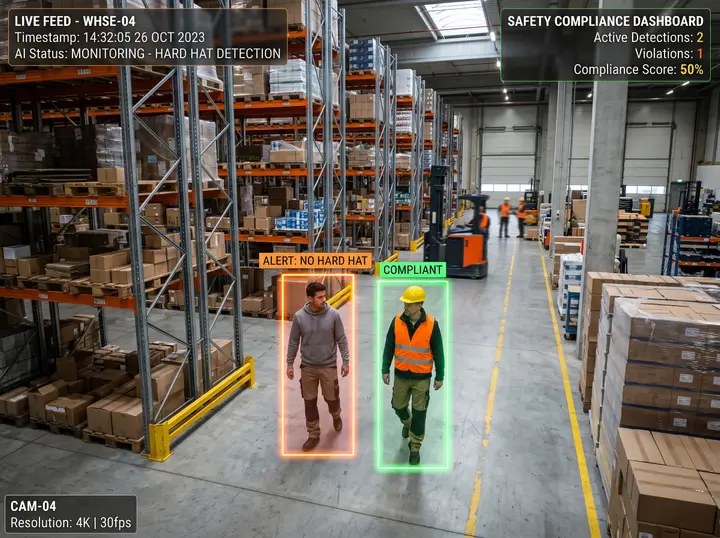
PPE Detection: Hard Hats, Hi-Vis Vests, Gloves & Goggles
Nsightify identifies workers missing required personal protective equipment — hard hats, high-visibility (hi-vis) vests, gloves, goggles — the moment a violation occurs. Every instance, on every camera, on every shift. Not only the ones a supervisor happened to walk past.
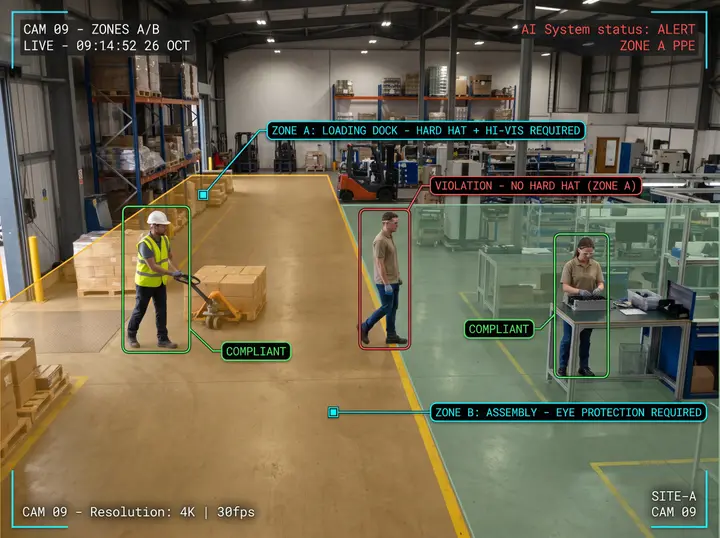
Per-Zone PPE Rules
One site rarely has one PPE policy. A loading dock, a machine floor, and a visitor corridor each carry their own requirements, and Nsightify enforces each of them independently on the same platform. Draw the zone, set what it requires, and the rule holds without anyone re-stating it at every toolbox talk.
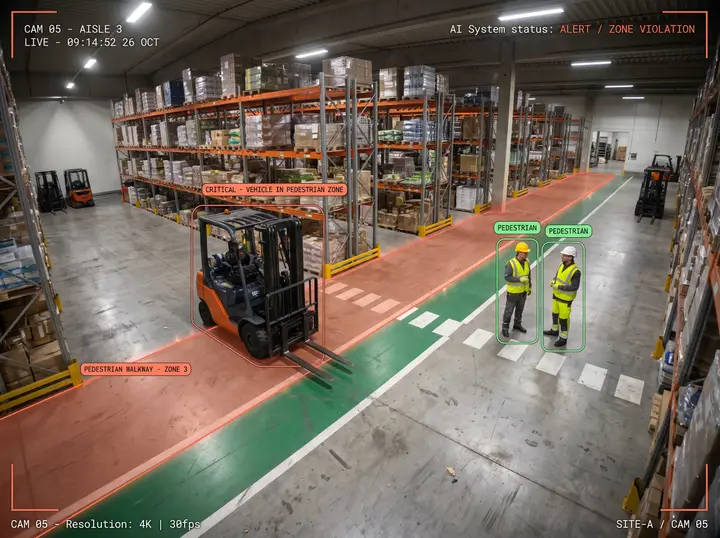
Unauthorized Vehicles in Pedestrian Walkways
Pedestrian–vehicle separation is the most enforceable safety rule on a floor and the hardest one to police. Mark your walkways, crossings, and pedestrian-only areas once, and Nsightify raises a critical alert the moment a forklift, truck, van, or car enters one — every shift, without a spotter posted at the corner.
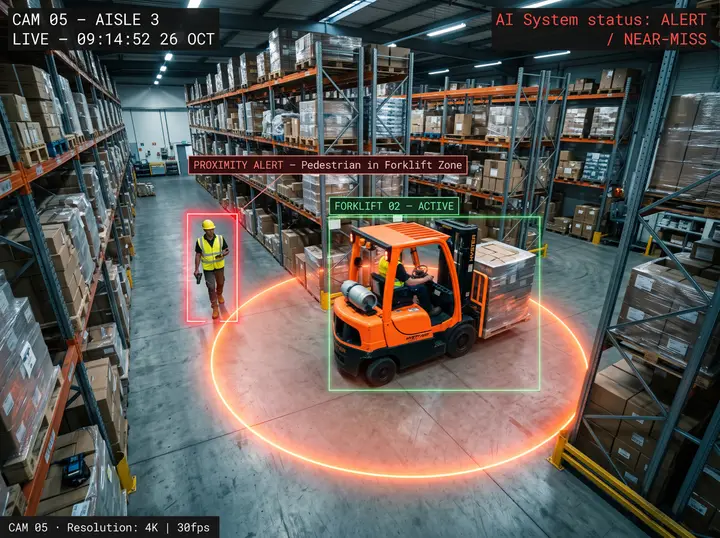
Forklift–Pedestrian Proximity Detection
Detect when a pedestrian comes dangerously close to an active forklift — turning near-misses from close calls into prevented incidents. Coverage runs across every camera, every shift, without a spotter.
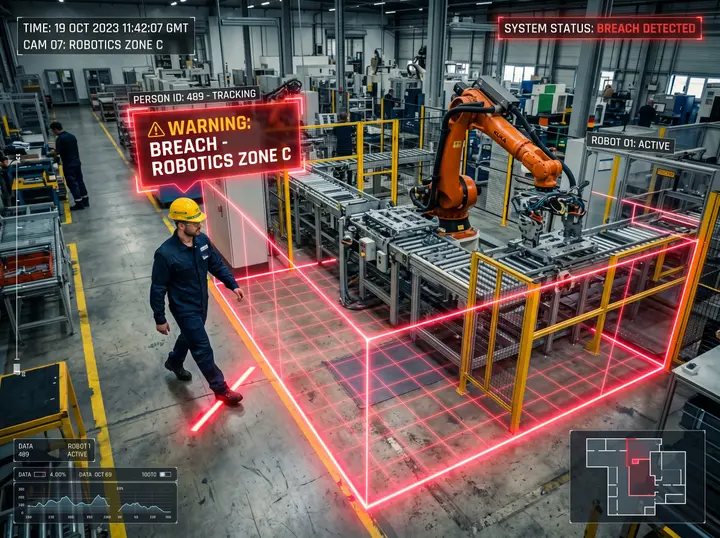
Hazard-Zone, Exclusion-Zone & Restricted-Area Enforcement
Define exclusion zones around active machinery, construction hazards, or high-risk areas. Nsightify alerts you the moment someone enters a zone they shouldn't — and separately when someone lingers in a space they should only be passing through. Before an incident happens, not after.
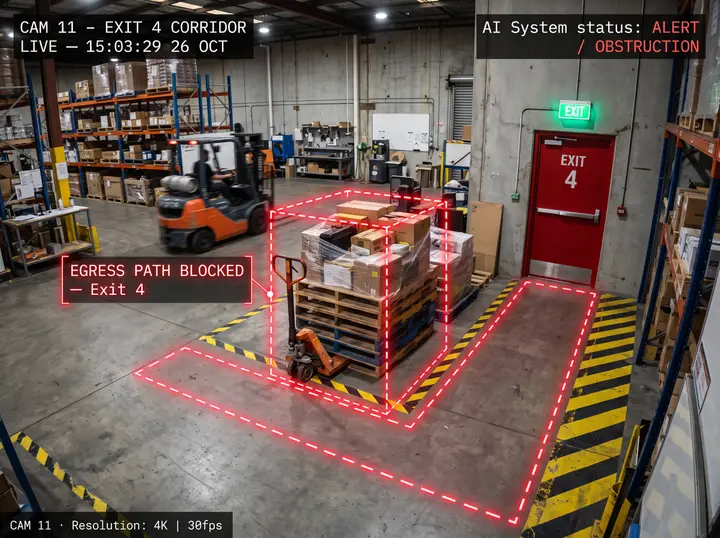
Blocked Exit & Egress-Path Detection
Catch when an emergency exit or evacuation route is obstructed by equipment, pallets, or vehicles. Get alerted in real time so obstructions are cleared before they become a safety violation — or worse.
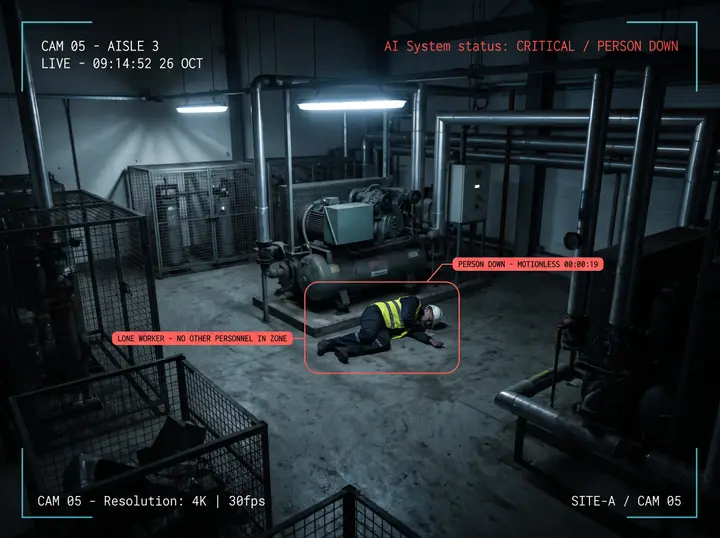
Person Down, Fleeing & Commotion Detection
The three signals that something has already gone wrong. A worker collapsed and motionless — the difference between being found in seconds and being found at the next round, which is the whole lone-worker problem. Someone running in a space that is normally calm. And sudden erratic movement or a group scattering, the earliest visible sign of an altercation or a panic.
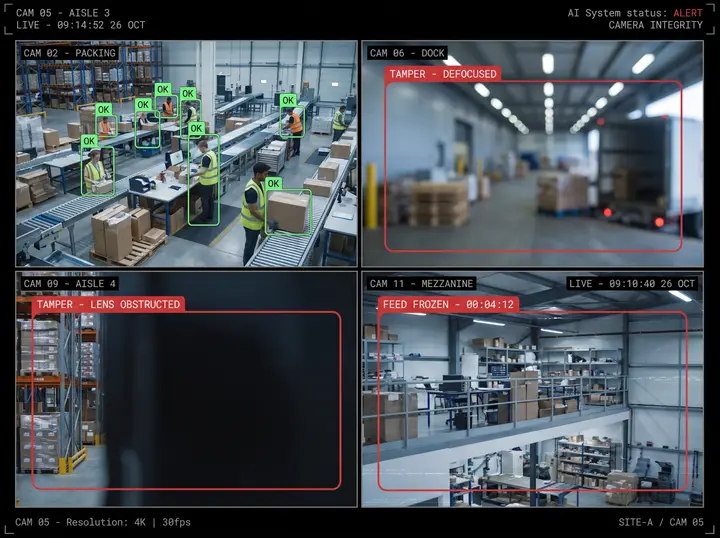
Camera Tampering Detection
Your safety coverage is only as good as the cameras behind it. Nsightify flags a lens that has been obstructed, spray-painted, defocused, or repositioned — and a feed that has quietly frozen — within seconds. It reads the picture itself rather than the objects in it, so it protects every camera you own.
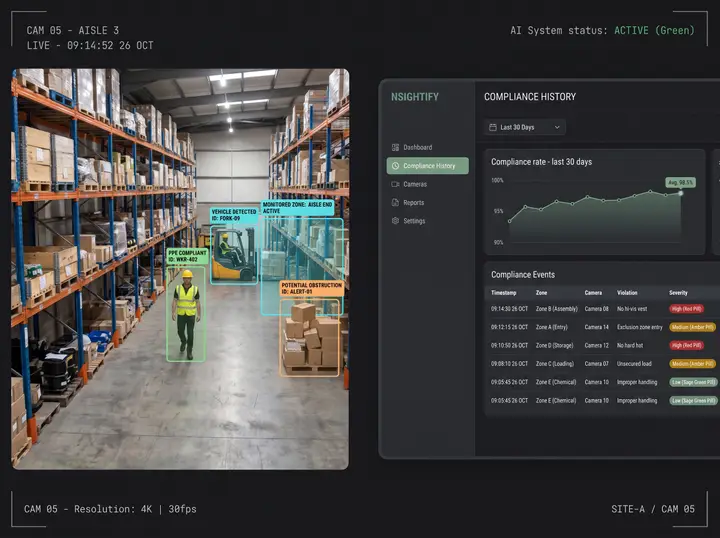
Audit-Ready PPE Compliance Records
Every detected violation is logged with a timestamp, zone identifier, and violation type. Access clean PPE compliance reports without pulling footage manually. Your records are always ready — including for an OSHA inspection that opens with a request for three years of injury records.
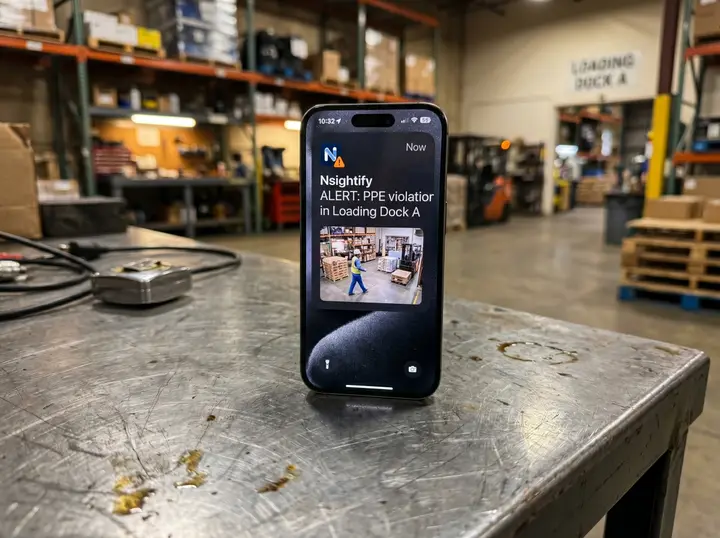
Alerts That Reach the Right People
Violations are surfaced immediately — via dashboard, local notification, or as a structured event your own systems consume. Configurable by zone, violation type, and personnel. The right person knows the moment something goes wrong.
What's included
Twelve Detections. All of Them Included.
Every detection below ships with Physical Safety and is visible in your settings from day one. There is no premium bundle and no add-on module. The only difference between the two groups is whether a detection is ready to run now or needs tuning against your footage first.
Included and ready to run
9 detections
All nine ship with the solution and are configurable from the day your cameras are connected. Some start the moment a zone is drawn; the rest are a single toggle away in the camera’s settings, because not every detection belongs on every camera.
-
PPE compliance
Anyone in a monitored area without the hard hat, high-visibility vest, gloves, or goggles that area requires. Every instance is caught, on every camera, on every shift — not only the ones a supervisor happens to walk past.
-
Unauthorized vehicle in a pedestrian zone
A forklift, truck, van, or car entering a walkway, crossing, or pedestrian-only area. Pedestrian–vehicle separation is the most enforceable rule on a floor, and this is what enforces it when nobody is watching.
-
Blocked exit and obstructed egress path
An emergency exit, fire lane, or evacuation route blocked by a pallet, a vehicle, or a person. This is the fire-code story: obstructions get cleared while they are still an inconvenience rather than a citation.
-
Camera tampering
A lens obstructed, spray-painted, defocused, or repositioned, and a feed that has quietly frozen. Your safety coverage is only as good as the cameras behind it, so the platform watches its own eyes.
-
Forklift–pedestrian proximity
A pedestrian coming dangerously close to an active forklift. Near-misses stop being close calls nobody logged and start being incidents you prevented.
-
Person down
Someone collapsed or lying motionless in a monitored area. It matters most where people work alone — night shifts, plant rooms, remote corners of a site, eldercare — and turns a discovery at the next round into an alert in seconds.
-
Crowd and occupancy limits
A live headcount for any area with an alert above the maximum you set. Muster points during a drill, control rooms, confined spaces, and anywhere a capacity limit is written into your procedures.
-
Restricted-area dwell
Someone standing in a space they should be passing through — a machine area, a plant room, the wrong side of a guard rail.
-
Entry into a restricted machine area
A person crossing into an exclusion zone around active machinery or a construction hazard. Set the boundary once and it is enforced on every shift.
Calibrated to your site first
3 detections
Also included, and switched on during commissioning once they have been tuned against your own footage. A busy floor and a quiet one look very different to these detections, which is exactly why they are calibrated rather than assumed.
-
Running or fleeing
Unusually fast movement in a space that is normally calm. Brisk walking is fine; someone sprinting away from something is worth knowing about immediately.
-
Crowd commotion and dispersal
Sudden erratic movement or a group scattering at once — the earliest visible indicator of an altercation, a panic, or an unplanned evacuation.
-
Elopement and wandering
A person crossing a containment boundary outbound: a patient leaving a memory-care unit, a child past a property line. A narrow but high-consequence detection for the sites that need it.
How it works
From Camera to Compliance
Connect
Point Nsightify at your existing IP cameras. Supports any RTSP-compatible device. No camera replacement.
Configure
Define your monitoring zones and the safety conditions to enforce — PPE requirements, hazard zones, exit paths, forklift areas. Set different rules for each zone.
Monitor
Nsightify analyzes every frame and delivers real-time violation alerts and compliance logs — continuously. Run it in our cloud, or fully on-premises with no cloud dependency.
What setup involves
Three Things Worth Knowing Before You Start
You decide where the boundaries are. Zone detections prompt you with a shape to place on the camera view — the walkway, the exit route, the machine area. Line detections, such as elopement, need you to draw the line first, and they stay quiet until you do. It takes a minute per camera and it is the difference between alerts that matter and alerts your team learns to ignore.
Any detection can be put on a schedule. Restrict a detection to a shift, a night window, or a weekend, and choose whether evidence is still captured outside it. A rule that makes sense during production does not have to fire during cleaning.
Commissioning tunes the system to your site. Time windows are set to your timezone, and the early-access detections are calibrated against your own footage before they are switched on — because a busy floor and a quiet one look very different to them.
Deployment
Choose How You Deploy
Nsightify Cloud
Multi-Site From One Interface
Access safety alerts and compliance records via the cloud dashboard. Manage PPE policies and hazard zones across every site from a single interface.
Nsightify On-Premises (Zero Trust)
Offline-First, On Your Network
Run Nsightify entirely on your own server(s). No footage leaves your network. Offline-first operation means safety coverage continues even during connectivity outages. Ideal for sites with strict data sovereignty requirements.
How it fits together
From Camera to Compliance
You keep your cameras. The only extra piece is the Nsightify Edge Relay — and only when your cameras can't reach the internet directly.
Your existing cameras
Any RTSP / IP / CCTV. No replacement.
Nsightify Edge Relay
A pre-configured mini-PC — only if your cameras can't reach the internet.
Nsightify Cloud
Fully managed. We run the AI for you.
Your own server(s)
Zero-Trust, on-premises. Video never leaves your network.
Real-time alerts & dashboard
Instant notifications and a live operations view.
Logs & compliance
Event logs, compliance records, events pushed to your systems.
Comparison
Nsightify vs. How Safety Gets Checked Today
Industries
Continuous Monitoring for Every Kind of Floor
Construction
Job sites are high-risk, high-movement environments with shifting headcounts and changing hazard conditions. Nsightify monitors every active zone — across an entire site, in real time.
Manufacturing
Production floors operate around heavy machinery, chemical exposure, and strict safety protocols. Nsightify enforces compliance continuously without interrupting production.
Warehousing & Logistics
Forklift traffic, loading docks, and high-density worker zones require constant coverage. Nsightify keeps every corner of your operation monitored — at scale.
Energy & Utilities
High-consequence environments where PPE is non-negotiable, and where lone workers are the norm rather than the exception. Nsightify enforces compliance at every monitored zone and raises a person-down alert in seconds.
Healthcare & Eldercare
Person-down detection for residents and lone staff, occupancy limits for control rooms and confined spaces, and elopement alerts when someone crosses a containment boundary they should not — a memory-care unit, a ward door, a property line.
FAQ
PPE Detection & Physical Safety FAQ
What is PPE detection software?
PPE detection software uses computer vision to read your existing camera feeds and identify people who are missing required personal protective equipment — a hard hat, a high-visibility vest, gloves, or goggles — at the moment the violation occurs. Instead of a supervisor catching it on a walkthrough, the system flags every instance across every camera continuously and logs it with a timestamp and zone.
Can AI detect hard hats and hi-vis vests on existing CCTV cameras?
Yes. Nsightify performs hard hat and hi-vis detection on the RTSP-compatible IP and CCTV cameras you already own — no specialised or on-camera analytics hardware is required. The feed is analysed either in Nsightify Cloud or on your own servers, depending on the deployment you choose.
Which PPE types can Nsightify detect?
Common equipment including hard hats, high-visibility (hi-vis) safety vests, gloves, and goggles, configurable by zone so each area enforces its own requirements. A loading dock, a machine floor, and a visitor corridor can each run a different PPE policy on the same platform.
Do I need to buy new cameras?
No. Nsightify works with the RTSP-compatible IP and CCTV cameras you already have — you never replace them, and there is no rewiring.
Do I need any hardware besides my cameras?
You keep your cameras. With Nsightify Cloud, the only possible addition is a small Edge Relay (software on a regular PC on your network) — and only if your cameras can’t reach the internet directly. With On-Premises (Zero Trust), you provide one or more servers where Nsightify runs locally so video stays on your network.
Does my footage leave my network?
It depends on your deployment. With Nsightify Cloud, video is streamed to the cloud for analysis. With On-Premises (Zero Trust), video never leaves your network — only lightweight metadata such as event descriptions, timestamps, and zone identifiers is transmitted.
How quickly can we go live?
Most deployments are configured and delivering alerts within a day. There is no months-long implementation.
Beyond PPE, what else can Physical Safety detect?
Twelve detections ship with Physical Safety. Nine are included and ready to run: PPE compliance, unauthorized vehicles in a pedestrian walkway, blocked exits and egress paths, camera tampering, forklift–pedestrian proximity, person-down, crowd and occupancy limits, restricted-area dwell, and entry into a restricted machine area. The remaining three — running or fleeing, crowd commotion, and elopement — are calibrated against your own footage during commissioning before they are switched on.
Can Nsightify detect forklift near-misses?
Yes. Forklift–pedestrian proximity detection alerts you the moment a pedestrian comes dangerously close to an active forklift, so near-misses become prevented incidents instead of close calls.
Can it stop forklifts and trucks entering a pedestrian walkway?
Yes, and it is included and ready to run from day one. Mark your walkways, crossings, and pedestrian-only areas once, and Nsightify raises a critical alert the moment a forklift, truck, van, or car enters one. Pedestrian–vehicle separation is the single most enforceable safety rule on a warehouse floor, and this is the detection that enforces it on every shift without a supervisor present.
Can Nsightify detect a worker who has collapsed?
Yes. Person-down detection flags someone lying motionless in a monitored area and alerts immediately — the difference between a lone worker being found in seconds and being found at the next round. It is relevant anywhere people work alone: plant rooms, night shifts, eldercare, and remote areas of a site.
Can I run different safety rules in different areas?
Yes, and most sites do. Every zone carries its own rules, so a loading dock, a machine floor, and a visitor corridor can each enforce different PPE requirements and different detections on the same platform. Every detection also carries its own schedule, so rules can differ by shift as well as by area.
Can Nsightify send safety events into the systems we already use?
Yes. Every detection is published as a structured event over an API and outbound webhooks, and alerts route to the channels your team already checks — so a violation reaches people without anyone watching a second dashboard. If a safety event needs to reach an internal tool we don’t already connect to, we scope that integration with you during onboarding rather than asking you to work around it.
Ready to Automate Safety Compliance?
Tell us about your site. We'll show you exactly how Nsightify maps to your existing cameras and what real-time compliance monitoring looks like for your operation.