Loitering Detection False Alarms: Calibrating Dwell Time
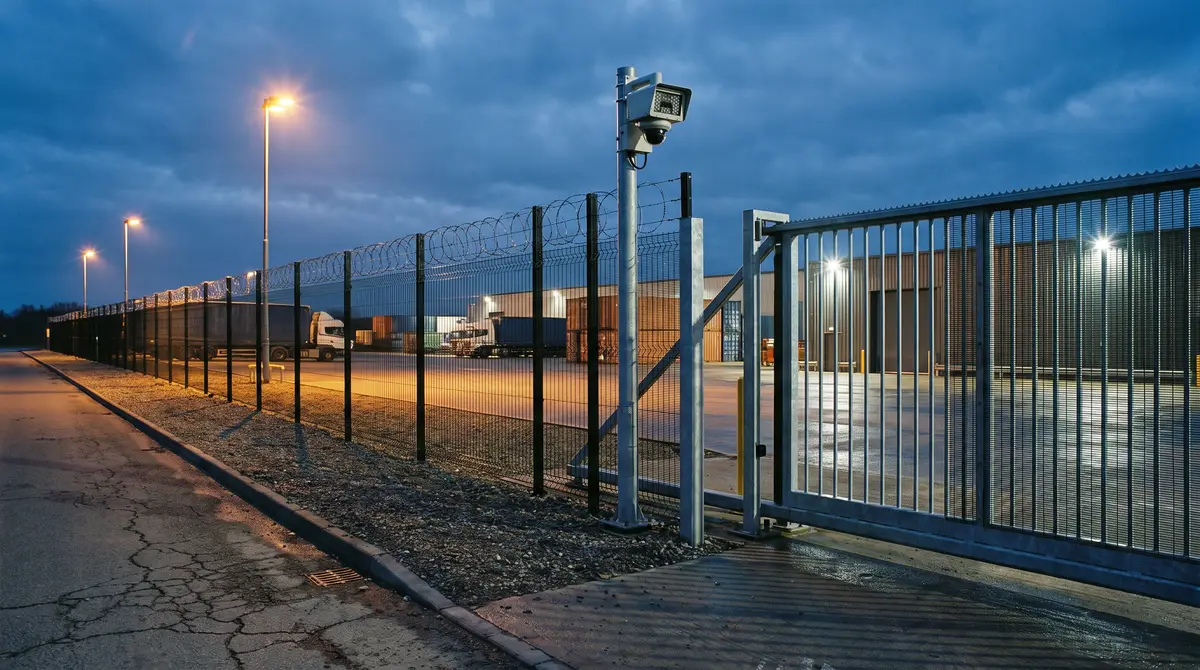
A delivery driver steps out of a cab at an entrance gate to check shipping paperwork on a clipboard. Forty seconds later, an automated alarm flashes on the monitoring console in the security operations center, flagging an unauthorized intruder lingering on the perimeter. By the fourth time this happens during a morning shift, the security officer clicks acknowledge without looking at the video feed.
When an intruder spends two minutes testing fence fabric behind a row of trailers, that alert lands in the same noisy queue. Behind most loitering detection false alarms sits one setting: a static timer that treats every pause as a breach.
Where loitering detection false alarms come from
Loitering detection is a video analytics rule that raises an alert when a person or vehicle stays inside a drawn zone longer than a set time. Most systems implement it as one timer per zone: an installer draws a box around a gate, yard or fence line and picks a threshold, such as thirty seconds. Everything the rule knows is how long something has stayed.
In a sterile test environment, that logic holds. In a live commercial facility, it collapses under normal daily operations.
Delivery Driver Paperwork
Driver checking manifests and gate pass on clipboard. Legacy 30s timer flags routine delivery as active intrusion.
Guard Shift Changeover
Security officers debriefing during shift handover. Static box timer triggers repeatedly during daily turnover.
Staged Tractor-Trailer
Truck waiting for spotter or dock door assignment. Pixel motion triggers continuous false loitering warnings.
Hostile Fence Inspection
Intruder scoping fence fabric, locks, and camera angles while continuously moving. Lost in queue noise.
The intrusion alarm industry has already lived through this problem at scale. In its problem-oriented policing guide False Burglar Alarms (2nd edition, August 2011), the U.S. Department of Justice Office of Community Oriented Policing Services reports that between 94 and 98 percent of the alarm calls police respond to are false, higher in some jurisdictions. The guide gives no single measurement year; the examples beside the figure are U.S. city records from 1999 to 2004.
That figure describes panel-based burglar alarms rather than camera analytics, and the mechanism is the one that matters here: a detector with no way to judge context produces alerts nobody can afford to trust. The industry’s answer at the panel layer was ANSI/SIA CP-01, the Control Panel Standard – Features for False Alarm Reduction, which recommends design features for control panels and the devices that arm and disarm them. It governs how a panel arms, disarms and reports. Nothing in it tells an outdoor camera what should count as suspicious in the first place.
The cost lands on the person watching the console. Every nuisance alert spends a unit of attention, and attention is finite across a twelve-hour shift. Once the queue is mostly noise, acknowledging without watching becomes the rational response. Security teams call this alert fatigue.
Two fixes tempt from here, and both fail. Raising the timer to five minutes quiets the console and hands an intruder five minutes. Switching the loitering alert off quiets it completely.
Three assumptions built into a single loitering timer
One timer per zone quietly assumes three things: that every zone has the same normal dwell, that direction doesn’t matter, and that every object deserves the same rule. Each assumption fails somewhere different.
1. The assumption of uniform dwell across diverse operational zones
A single facility contains distinct operational environments with very different dwell baselines. At a typical distribution site, for example:
- At an access gate, a truck waiting for clearance idles for a minute or more.
- In a staging yard, a forklift driver setting down a pallet stays put for thirty seconds before reversing.
- At an external employee break area, workers stand together for ten to fifteen minutes.
- Along an isolated rear fence line, a person standing still for more than fifteen seconds has no operational reason to be there.
When a security system applies one thirty-second timer across every outdoor camera, it raises a stream of nuisance events in working zones while failing to provide sensitive, early detection where exposure is highest.
2. Missing directional and vector intelligence
Legacy loitering analytics track bounding boxes without calculating directional intent. A person walking on a public sidewalk adjacent to a facility fence line enters the camera field of view and moves steadily at three miles per hour. Because the camera has a wide-angle lens covering a long perimeter span, the pedestrian remains inside the detection zone for thirty-five seconds simply by walking past.
Without spatial vector analysis, the camera cannot distinguish between a pedestrian walking in a straight line past the property and an individual pacing back and forth to inspect security gates. Both trigger the same loitering rule because both stayed in the frame for more than thirty seconds.
3. Inability to classify object types and staging states
Basic pixel-based motion detection has no idea what an object is. When a logistics contractor parks a flatbed trailer along a yard perimeter, the detector treats the trailer as a new object. As shadows shift or headlights sweep across the trailer body, the changing pixels register as activity, and the alerts repeat through the night.
True perimeter visibility requires classifying people, passenger vehicles, and heavy commercial trucks independently, applying distinct temporal rules to each classification.
An alarm system that alerts on every delivery truck teaches your security team to ignore real perimeter breaches.
Directional dwell: rules by zone, object class and time of day
Directional dwell replaces the single timer with rules that ask more than one question. Instead of asking how long an object has been in a box, the system evaluates what the object is, where it entered, which direction it is traveling, and whether its dwell pattern matches legitimate operations.
Public Right-of-Way Buffer (Sidewalk & Roadway Approach)
Exterior Fence Line Buffer (10-Foot Sterile Strip Along Fence)
Active Yard & Gate Operations (Loading Docks, Gates & Staging Yards)
Directional dwell analytics evaluates a classified person or vehicle inside a defined perimeter zone by its trajectory, its travel speed and how long it stays. It separates authorized operational activity from stationary loitering or perimeter reconnaissance without relying on one timer for the whole site.
| Evaluation Dimension | Static Bounding-Box Timers (Legacy CCTV) | Directional Dwell Analytics (Modern Computer Vision) |
|---|---|---|
| Primary Trigger | Total elapsed seconds inside a 2D bounding box | Trajectory, velocity, object class, and dwell duration |
| Sidewalk & Gate Transit | Triggers false alarms on long camera spans | Suppressed via linear vector continuity and transit velocity |
| Object Classification | Generic motion blob / unclassified bounding box | Independent models for humans, light vehicles, and heavy trucks |
| Operational Staging | Floods console on parked trailers and break areas | Handled via contextual time-of-day masks and multi-tier thresholds |
| Pre-Incident Detection | Blind to pacing or slow perimeter inspection | Flags low net displacement and repeated perimeter passes |
The numbers in the four steps below are example starting points, not standards. Every site tunes its own against what its cameras actually see.
Step 1: Establishing concentric perimeter buffer zones
Concentric zoning is the structural fix. Instead of one detection box per camera, divide the site by exposure: the further a zone sits from legitimate daily operations, the tighter its dwell threshold.
- Outer Transit Zone (Public Right-of-Way): Covers sidewalks and public access lanes. Configured with directional tripwires that track approach vectors toward the facility but ignore parallel foot and vehicular traffic.
- Perimeter Sterile Buffer (Fence Line): A ten-foot interior buffer along fencing and property boundaries where no legitimate operational staging occurs. Configured with a tight fifteen-second dwell threshold and instantaneous crossing tripwires.
- Operational Core (Gates, Docks, and Staging Yards): Configured with wider dwell tolerances during business hours, up to three minutes for a truck at the gate, automatically tightening to zero-tolerance intrusion detection after hours.
Step 2: Calibrating multi-threshold timing by object class
Different physical objects carry different operational baselines. Calibrated video analytics applies separate temporal rules based on neural network object classification:
Accommodates brief driver dismount, badge scan, or gatehouse intercom check. Extended loitering beyond 45s flags guard attention.
Accommodates shipping manifest review, BoL paperwork inspection, and spotter coordination without nuisance alarms.
Zero legitimate operational presence along exterior fencing. Stationary presence exceeding 15s triggers immediate priority escalation.
If a delivery truck stops at an inbound security gate, the system applies a three-minute vehicle threshold, allowing the driver to scan credentials and speak with the gate attendant without triggering an alarm. If a person exits that vehicle and walks toward an unmonitored equipment yard, a separate forty-five-second pedestrian rule activates immediately.
Step 3: Detecting perimeter pacing and reconnaissance
The behavior worth catching early doesn’t have to involve standing still. The Department of Homeland Security’s Nationwide SAR Initiative indicators list testing or probing of security, and unusual or prolonged interest in a facility, among the behaviors analysts should look into. They also treat neither as criminal on its own, which is the same distinction a loitering rule has to draw.
On a perimeter camera, the version a detection can look for is movement: walking a stretch of fence and back, stopping at a gate, returning to the same section. A single timer misses it, because the person never stays in one place long enough to trip it. Directional computer vision tracks the cumulative path within a zone. Repeated direction reversals, low net displacement over sixty seconds, or lingering within five feet of a barrier mark the pattern as perimeter pacing and reconnaissance.
Step 4: Automating time-of-day sensitivity schedules
Perimeter activity that is completely normal at 2:00 PM is worth an alert at 2:00 AM.
During daytime operating shifts, yard cameras run wide dwell thresholds (two to three minutes) to accommodate material handlers, shift changes, and contractor staging. At the end of the operating shift, the rules switch to an after-hours schedule:
- Dwell thresholds along all exterior zones compress to ten seconds.
- Directional tripwires along gates switch to instant intrusion alerting.
- Any classified person inside an equipment yard alerts the on-site team immediately.
Running loitering and dwell rules on existing perimeter cameras
Nsightify connects to the RTSP-compatible IP cameras already on the fence line, so nothing gets replaced. It deploys as Nsightify Cloud, or as On-Premises (Zero Trust) on your own servers, where no footage leaves your network.
These detections are included in Nsightify Perimeter Security and ready to run:
- Loitering: someone stays in a monitored area past the dwell time you set.
- Restricted-area dwell: the stricter rule for space where nobody should stand still.
- Directional tripwire crossing: a line with a direction, so someone coming in raises an alert and everyone going out doesn’t.
- Stopped vehicle: a vehicle stationary at a gate approach or in a fire lane longer than you allow.
- After-hours zone entry: anybody in a scheduled zone, such as the yard at 2:00 AM.
- Camera tampering: a lens blocked, spray-painted, defocused, or repositioned.
Perimeter pacing and reconnaissance, wrong-way movement, and fence-climbing are included too, and switched on at commissioning once tuned against your own footage. Any detection can be put on a schedule: restrict it to a shift, a night window, or a weekend, and choose whether evidence is still captured outside it.
Optical analytics has physical limits: video analytics at night needs its own test, and pixels per foot on the target decides how far along a fence a rule can work. Fog, heavy snow, and dirty domes degrade tracking. Nsightify sharpens the response of the people guarding a site. It is not a physical barrier.
Frequently asked questions
What is the technical difference between loitering and dwelling in video analytics?
Dwelling measures any duration of classified human or vehicle presence inside a designated virtual zone regardless of intent, such as a truck waiting at an infeed gate. Loitering represents unauthorized or anomalous stationary presence that exceeds a calibrated operational threshold or occurs in restricted zones during non-operational hours without legitimate transit activity.
Why do simple 30-second camera loitering timers generate so many false alarms?
Static timers trigger on total elapsed time inside a bounding box without evaluating direction, velocity, or operational context. Delivery drivers checking manifests, employees in designated outdoor break areas, and contractors staging equipment all stay in place longer than 30 seconds, so each of them trips the timer.
How does directional dwell filtering reduce false alarm rates along fence lines?
Directional dwell tracks the entry vector and vector continuity of people and vehicles. Pedestrians walking parallel to a fence line along an exterior public sidewalk maintain forward momentum and clear the field of view, while individuals pacing back and forth, changing direction repeatedly, or lingering near structural weak points trigger immediate investigation alerts.
Does deploying calibrated loitering analytics require installing new IP cameras?
No. Video analytics platforms read the stream an existing IP camera already produces, usually over RTSP, and older analog CCTV cameras can be reached through the recorder or an encoder that serves the same kind of stream. Directional tripwires, polygon masks, and multi-threshold dwell rules are configured in software, without replacing camera hardware or running new cabling.
How do you evaluate false positives in loitering and intrusion detection?
Count them against a baseline from your own site. Log every loitering and intrusion alert for two to four weeks, and have a reviewer mark each one as a real event or a nuisance, with its cause: a delivery check-in, sidewalk traffic, a parked trailer. Report nuisance alerts per camera per shift, then change one threshold or zone at a time and measure again over the same length of time.
Start with your five noisiest perimeter cameras
Cutting loitering false alarms doesn’t require new cameras or more people watching them. Start with the five exterior cameras that alert most, typically the main logistics gate, a contractor entrance, and the primary yard fence lines.
Take three calibration steps on each camera:
- Find your top three nuisance triggers: Review the last thirty days of alarm logs. Identify whether delivery check-ins, shift changes, or sidewalk foot traffic caused most of the nuisance alerts.
- Separate pedestrian and vehicle thresholds: Replace one timer per zone with thresholds by object class, for example forty-five seconds for people and three minutes for trucks at the gate.
- Draw the zone along your property line: Mask public sidewalks and roadway lanes out of the loitering zone, so the rule watches only your side of the fence. Masking narrows what the rule analyzes. The camera still records the sidewalk, and the recorder still keeps that footage.
Then count again over the same thirty days, the way video analytics accuracy should be tested: on your own footage, against the baseline you just made. When the queue holds fewer, better alerts, the officer who used to click acknowledge starts watching again.
To watch dwell rules drawn on your own gate and fence views, schedule a perimeter security demo with Nsightify.
More on this from Nsightify: AI video analytics on existing IP and CCTV cameras.

See Nsightify in Action
We're onboarding a limited number of pilot partners. If you're an operations or security leader in construction, warehousing, or manufacturing — let's talk.